

DFI Part 7
- Jules Watts
- Sep 3, 2019
- 2 min read

It started off with utilising Youtube for live streaming. This could be great for streaming our sports live but however, I do feel this may take a little bit of setting up money wise so it would be a long term goal.
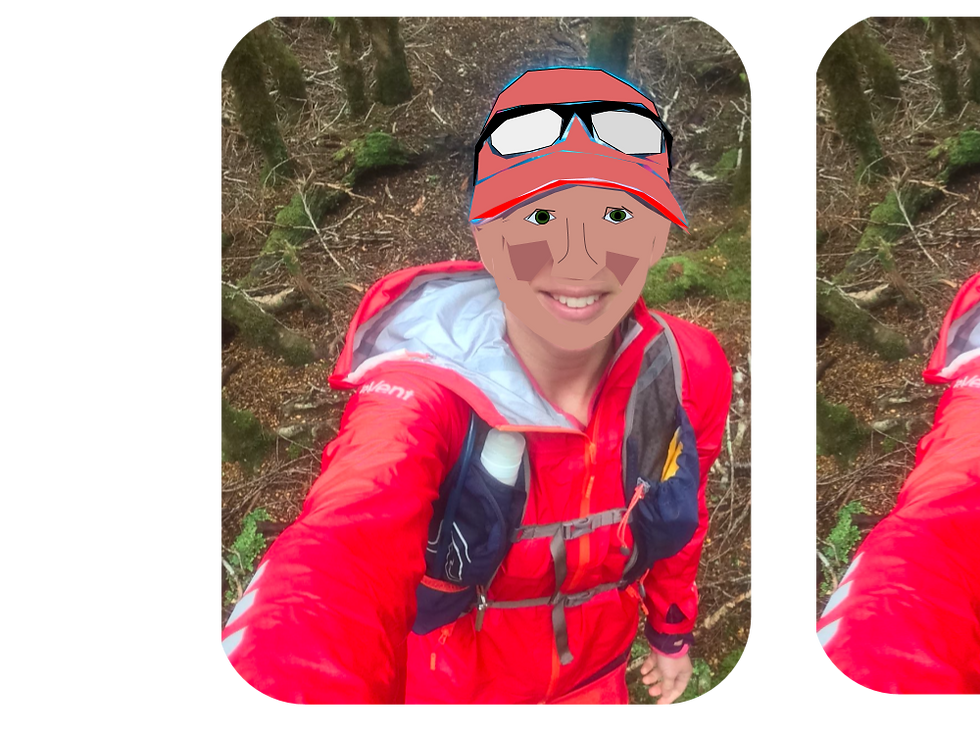
We then moved on to using youtube and creating a channel, which I have already set up so it was good to know how to embed a playlist into my learning site, meaning the students can click on the playlist from there. That is really useful for my class as they are always wanting to listen to music. I have already attached the start of a playlist on to my media page which I made from last week. We then had a bit of time to investigate different ways of using slides and draw. There are so many different ways to use these tools and it's useful to look at these. I quite like the idea of using a slide as view only where they can't see the comments but collaborators can. Here I can write comments on slides and not double handle my planning, which to be fair is happening currently and it is quite frustrating. Adding an extra text box of either side of the slide for extra teacher planning and comments is a really helpful tip. I have on the occasion used this for instructions in google draw and maybe once in slides.
As part of the 'playing time' I at first wasn't sure what to make but then decided on using google draw and a picture of me to practice on, which the picture of the results are above. This is quite difficult but once finished quite rewarding. I utilised the colour picker from previous sessions to help with my different skin tones, hence the coloured check section. Yes it needs a little work still. I would like to continue with this drawing over time to include on my class learning site and also my personal adventure website which I am gradually changing and building. It would be neat for all students to add their self-portraits as part of some sort of collaborative art and each face then links through their blogs. I can see it in my mind, but it may be difficult to put together.
Being introduced to a few extra tips on html for blogs is also a really helpful hint.
All in all, a productive day.
Your Google Draw self portrait looks great Jules and I'm sure we could challenge your students to do this. There was lots of amazing ideas shared today and it's great that you can see where they would be well used in your teaching.